← Explore the Kids Game & AI Lab
Teaching fit: Ages 8–14 with guidance · Plan for: 45–60 minutes
You need: A laptop, desktop or Chromebook browser. Hardware and a chatbot are not required.
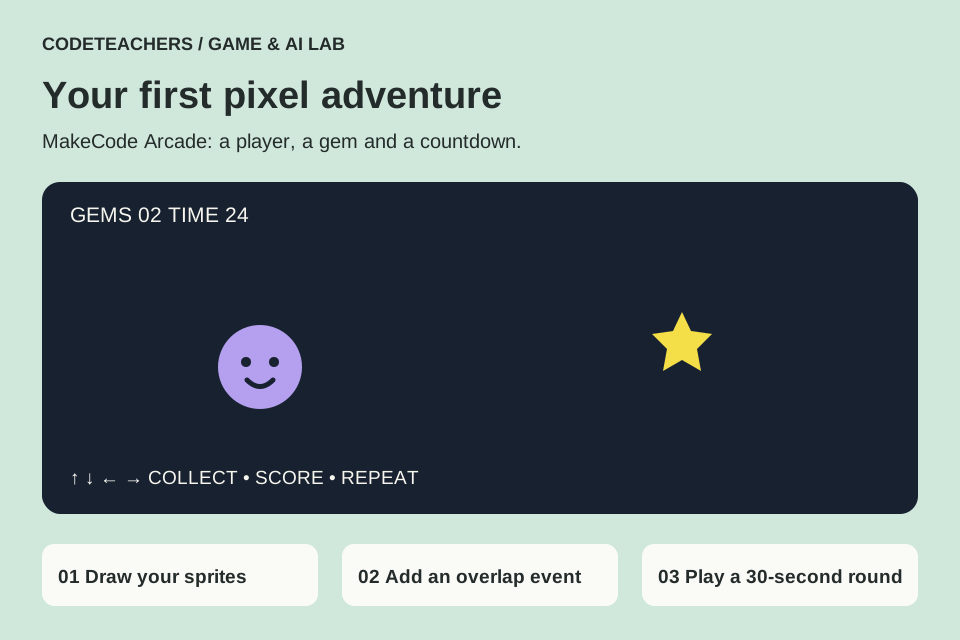
You will make: A top-down collector game with a 30-second round.
STEP 01
Open a new Arcade project.
Open MakeCode Arcade, choose New Project and name it Gem Collector. You can build with blocks, or switch to JavaScript and paste the complete starter source. Read the small program before changing it. The code uses built-in sprites and has no account connections.
STEP 02
Make a player that moves.
In Blocks, use Sprites to create a Player sprite in on start. Draw a small character. Use Controller → move sprite with buttons and set both speeds to 80. Add set stay in screen to ON. In JavaScript, these correspond to controller.moveSprite(player, 80, 80) and player.setStayInScreen(true). Test all four directions in the simulator.
STEP 03
Add a collectible and a score.
Create a second sprite with kind Food and draw a gem. Set its x position to a random number from 10 to 150 and y to 10 to 110. Add an on sprite of kind Player overlaps otherSprite of kind Food event. Inside it, increase score by 1 and move otherSprite to new random x/y coordinates. Keep the gem kind Food so the event matches it.
STEP 04
Define the round.
In on start, set score to 0 and start countdown at 30 seconds. The countdown provides a clear ending. Restart the simulator to begin a fresh round. Use the editor’s save/download controls to keep a local project copy; an adult should review any share link.
STEP 05
Make a deliberate improvement.
Change player speed from 80 to 50, play a round, then try 110. Which feels controllable? Change the gem art using the image editor. If overlap scoring does not work, check both sprite kinds. If the player leaves the display, make sure stay in screen applies to the player, not the gem.
Test it before you call it finished.
- All four directions move the player.
- The player cannot leave the screen.
- Collecting a gem changes the score and relocates it.
- The round ends after 30 seconds and resets cleanly.
Make it yours.
Add one obstacle or a second collectible worth more points. Keep a written rule before adding the code. Your game uses programmed logic; optional AI help might explain a bug, but no machine learning is required.
Show someone your project and explain one decision, one bug you fixed and any help you used. Save a local copy. Ask an adult before publishing a project or sharing identifying information.
← Explore the Kids Game & AI Lab