A small program becomes much more interesting when an AI assistant can discover what it does, supply the right inputs and inspect a structured result. You can build that connection without starting with a complicated business system. In this lab, you will create a Learning Resource Finder: a tiny MCP server that searches a fictional catalog by topic and available study time.
The finished project has one tool, a real protocol test and a clear explanation you can present in a portfolio. You will also learn why a tool that returns no matches can be working perfectly—and why a friendly-looking response does not prove that the code is correct.
The project you are building
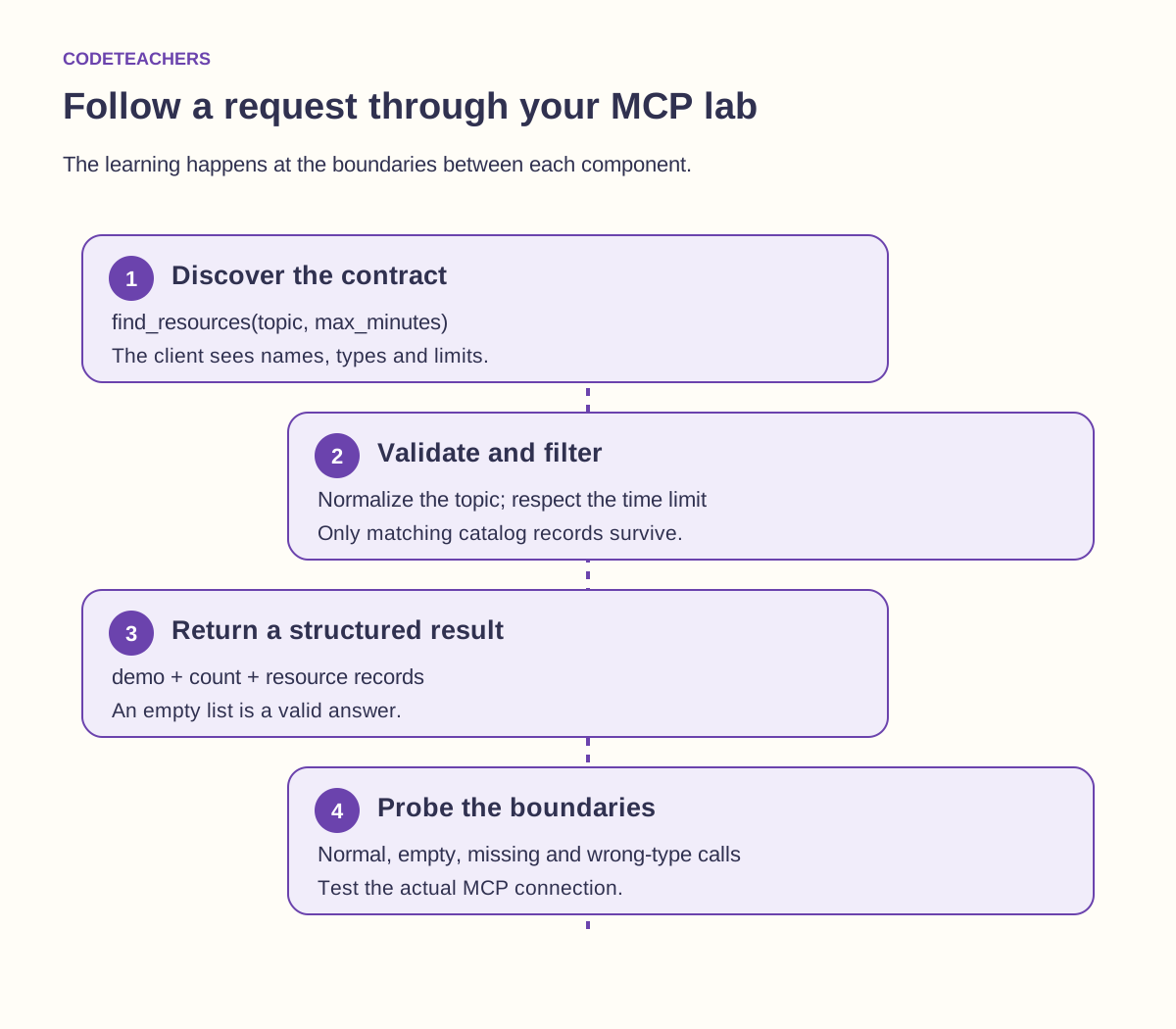
A learner has 20 minutes and wants to practice Python. The assistant calls find_resources with topic: "Python" and max_minutes: 20. The server finds the matching exercise in its catalog and returns a structured record with an ID, title, duration and format.
Everything in this catalog is fictional teaching data. The server does not enroll a learner, contact a website or store personal information. That gives you room to learn the connection itself before adding authentication, external APIs or deployment.
Your acceptance rule is simple: the tool must return only resources whose titles match the topic and whose duration fits the requested limit. Empty results must remain empty. Invalid input must produce an explicit error. These requirements make the project testable before an AI model is involved.
Three parts to keep straight
Your function is ordinary Python. It filters a list. The MCP server makes that function available through a discoverable tool interface. The AI application contains the client that connects to the server and can request a tool call.
For this lab, the application starts a local Python process and communicates through standard input and output, called the stdio transport. The server is not a website and does not need a public URL. Running it directly in a terminal may appear to do nothing because it is waiting for protocol messages.
WebMCP is a separate browser-focused topic. It lets a supporting browser interact with tools registered by an open webpage. Its current experimental API uses document.modelContext. You do not need WebMCP, a browser extension or a remote hosting account to complete this Python project.
Step 1: prepare a small, repeatable environment
Use Python 3.12 for the closest match to the tested lab. Download the MCP Builder Lab and open its folder in a code editor. Keep the server, test and requirements file together. A virtual environment prevents this exercise’s packages from mixing with those used by unrelated projects.
macOS or Linux:
python3 -m venv .venv
.venv/bin/python -m pip install -r requirements.txt
.venv/bin/python test_resource_server.py
Windows PowerShell:
py -3.12 -m venv .venv
.\.venv\Scripts\python.exe -m pip install -r requirements.txt
.\.venv\Scripts\python.exe test_resource_server.py
Calling the environment’s interpreter directly avoids needing to change your shell’s activation policy. The requirements file pins mcp[cli]==1.29.0. This lab deliberately uses the official SDK’s v1 maintenance line, tested with Python 3.12; it is not a claim that v1 is the newest SDK. SDK v2 is current, and a migration is a separate exercise. Keep the pin while reproducing these results.
Step 2: write the tool contract before changing code
A tool contract describes the promise your function makes to its caller. For this project, the topic must be a string containing at least one non-space character, with a maximum length of 80 characters. The time budget must be an integer from 1 through 120, and it defaults to 30.
| Part | Lab decision | Example |
|---|---|---|
| Name | State the action in plain language | find_resources |
| Inputs | Topic and maximum minutes | Python, 20 |
| Matching | Case-insensitive title substring, then duration filter | “ PYTHON ” matches Python loops |
| Output | Demo marker, count and resource records | One result with ID py-loops |
| No match | Successful search with an empty list | MCP with a 30-minute budget |
| Invalid request | Explicit tool error | Missing topic or a negative time budget |
The description says the tool never enrolls anyone. That keeps discovery clear: the assistant can distinguish a search from a booking action. The read-only hint describes this behavior, but the actual implementation must match it.
Step 3: inspect the complete server
The code below is the server included in the kit. The decorator registers the function as a tool. The type annotations and field constraints describe the inputs, while the function still checks the blank-after-trimming case. The structured return annotation makes the response useful to a caller that needs to inspect fields rather than parse a sentence.
"""Learning Resource Finder: fictional catalog, no network or credentials."""
from typing import Annotated
from pydantic import Field
from mcp.server.fastmcp import FastMCP
from mcp.types import ToolAnnotations

mcp = FastMCP("Learning Resource Finder")
CATALOG = [
    {"id": "py-loops", "title": "Python loops", "minutes": 15, "format": "exercise"},
    {"id": "py-functions", "title": "Python functions", "minutes": 25, "format": "lab"},
    {"id": "html-forms", "title": "HTML forms", "minutes": 20, "format": "lab"},
    {"id": "mcp-contracts", "title": "MCP tool contracts", "minutes": 40, "format": "project"},
]

@mcp.tool(annotations=ToolAnnotations(readOnlyHint=True))
def find_resources(
    topic: Annotated[str, Field(strict=True, min_length=1, max_length=80)],
    max_minutes: Annotated[int, Field(strict=True, ge=1, le=120)] = 30,
) -> dict[str, object]:
    """Find fictional learning resources by title and time limit. Never enrolls anyone."""
    query = topic.strip().casefold()
    if not query:
        raise ValueError("Enter a topic containing a non-space character.")
    matches = [item for item in CATALOG
               if query in item["title"].casefold() and item["minutes"] <= max_minutes]
    return {"demo": True, "count": len(matches), "resources": matches}

if __name__ == "__main__":
    mcp.run(transport="stdio")
Notice the order of the filter: a resource must satisfy both conditions. The code does not invent a shorter duration when nothing fits. It also preserves stable IDs. If you later rename a lesson, the ID can still identify the same resource in a saved plan.
Keep ordinary diagnostic output off standard output in a stdio server. The transport uses that stream for protocol messages. Use logging configured for standard error when you need diagnostics. A stray print statement can make an otherwise correct function harder for a client to communicate with.
Step 4: test the connection, not only the function
A direct Python call can prove that filtering works, but it cannot prove that a client can discover the tool or read its result through MCP. The included test starts the server as a child process, initializes an MCP session, lists tools and makes actual tool calls.
Run the test command from Step 1. The expected final message is PASS: 16 discovery, schema, result and validation cases. The test checks the tool name, read-only annotation and input schema, then exercises five successful requests and eight invalid requests. The number is a description of this lab’s checks, not a measure of production readiness.
Try to predict three outcomes before running them: Python with the default time limit returns two resources; Python with 20 minutes returns one; MCP with 30 minutes returns none. Then change the last limit to 40. Explaining why the answer changes is more valuable than simply seeing a green test.
The tests also reject a string such as "20" where an integer is required. Strict validation makes the contract visible: a caller should send the correct type instead of relying on silent conversion. If you choose different rules later, update both the contract and its tests.
Step 5: connect it to your AI application
For VS Code, the kit includes two example MCP configurations, one for macOS/Linux and one for Windows. Copy the matching configuration into .vscode/mcp.json in the project folder. Each points to the virtual environment’s Python executable and the local server file.
Use VS Code’s MCP controls to start the configured server and inspect the tools it exposes. Follow the application’s trust prompt for your own reviewed local project. Confirm that find_resources appears. Current setup and tool-management details are in the linked official VS Code documentation; the available AI features depend on your installation and account.
Now ask: “Use Learning Resource Finder to find Python practice I can finish in 20 minutes. Tell me the resource ID and the time budget you used.” Inspect the tool call as well as the assistant’s summary. A good summary should identify py-loops and its 15-minute duration. It should not claim that it opened the exercise or enrolled you.
Repeat with an impossible match: “Find an MCP resource that takes no more than 10 minutes.” The correct behavior is to report no match. If the assistant recommends a resource anyway, separate the issues: did the tool return the wrong record, or did the assistant ignore the empty result? Those require different fixes.
Debug by identifying the failing layer
| Symptom | First check | Useful next action |
|---|---|---|
| Python cannot import mcp | Interpreter and installed environment | Use the same environment path for installation, tests and the client command. |
| Client cannot start server | Executable path and script location | Run the configured interpreter with the test script from the terminal. |
| Tool is absent | Server startup and discovery | Inspect the client’s server output; confirm the decorator and registered name. |
| Tool returns empty resources | Catalog, matching rule and time budget | Try a known case; emptiness can be the correct result. |
| Assistant invents a lesson | Actual structured tool result | Require IDs from returned records and report when nothing matches. |
Change one thing at a time. If you simultaneously change the SDK version, tool name, catalog and editor configuration, a failure has too many plausible causes. Keep a known passing version and record the smallest change that produces the problem.
Step 6: earn the next feature
Choose one extension that makes the project more useful. You could add a format filter, return a short explanation of why each resource matched, or expose a second tool that looks up one resource by ID. Write the new acceptance cases first, including a case that should fail or return nothing.
For a format filter, decide whether values are a fixed set such as exercise, lab and project. Do not let the assistant invent a new format and silently treat it as “all.” For lookup by ID, distinguish an unknown ID from a malformed request. These small decisions are the substance of designing an agent-accessible product.
Moving from a local catalog to a real course database is a larger change. It introduces authorization, stale data, network failures and records that users should not see. Keep that as a separate milestone with its own tests. Publishing a server is not the next compulsory step in a beginner lab.
Turn the lab into a compelling portfolio story
Your project page can show a short problem statement, the tool contract, a successful request, an empty result and an invalid request. Include the exact environment and command needed to reproduce the tests. Explain one design decision, such as retaining an empty result instead of recommending something outside the time budget.
The MCP Builder Lab includes a project brief, an assessment rubric and a results journal. Use the rubric to evaluate behavior and explanation—not the amount of generated code. A strong submission makes it easy for another learner to run the project and understand why each result is correct.
For a classroom session, pair a builder with a tester. The builder explains the intended contract; the tester chooses a boundary case without looking at the implementation. Swap roles after the first pass. The conversation about mismatched expectations is often where the most useful learning happens.
Official references
- MCP architecture for hosts, clients, servers and transports.
- Official Python SDK v1 maintenance branch for the API used in this pinned lab.
- Python SDK migration documentation for the current v2 transition.
- Add and use MCP servers in VS Code for current client configuration.
- Chrome WebMCP imperative API for the separate browser-based approach.
Explore another application
- The Wealth Experiment: From one useful AI connection to a pocket product people can evaluate
- AI Side Hustle: Build your first MCP-assisted client service in a seven-day sprint
- Waymaker: From idea to connected MVP: build one MCP tool people can use
- OutcomeDriven: Did the agent actually help? A practical MCP workflow experiment
- MarketingCoach: Give your marketing agent the evidence before you give it the controls